⚡ Quick Answer
HRMS Bihar helpline number: 0612-2217601
Email: hrmshelp-bih@nic.in
Hours: Monday to Saturday, 8:00 AM – 10:00 PM
Portal: hrms.bihar.gov.in
You are not alone if you have been sitting with a portal problem for the last hour, searching for a working HRMS Bihar contact number. It happens to a lot of employees. The salary slip is not generating. The password reset OTP is not coming. Or the service book has a wrong entry and you do not know who to call.
This page gives you every official contact — the HRMS helpline, customer care email, complaint number, and district-level NIC support — clearly and without fluff. Bookmark it. You will need it again.
HRMS Bihar Official Helpline — All Support Contacts 2026
Here are all the official support channels for the HRMS Bihar portal, in one consolidated table. These are verified from the official portal as of March 2026.
| Contact Type | Details | When to Use |
|---|
| 📞 Helpdesk Phone | 0612-2217601 | Login issues, salary slip, password reset, general queries |
| 📧 Support Email | hrmshelp-bih@nic.in | Written complaints, document submission, follow-ups |
| 🕐 Support Hours | Monday to Saturday, 8:00 AM – 10:00 PM | Phone support available during these hours only |
| 🌐 Official Portal | hrms.bihar.gov.in | Login, Complaint Module, self-service resolution |
| 📋 Grievance Portal | cpgrams.gov.in | Escalation if HRMS complaint unresolved after 72 hours |
| 🏢 District Support | 38 District NIC Centres | Hardware / software / biometric issues at district level |
| 🏛️ L3 Policy Issues | HR Directorate, Patna | Legal disputes, salary revision, serious account errors |
📞
L1 HELPDESK
HRMS Contact Number
Primary helpline for all employees
0612-2217601
📧
EMAIL SUPPORT
HRMS Customer Care Email
Written support, response in 24-48 hrs
hrmshelp-bih@nic.in
🏢
L2 SUPPORT
District NIC Centres
All 38 districts — hardware & software
bihar.nic.in ↗
📋
ESCALATION
CPGRAMS Grievance
If HRMS complaint not resolved in 72 hrs
cpgrams.gov.in ↗
HRMS Bihar Helpdesk — Three-Tier Support System
Most employees do not know this, but the HRMS Bihar support system has three distinct levels. Calling the right level saves a lot of time. Here is how it works.
1
L1 — Portal Helpdesk
Call 0612-2217601 or email hrmshelp-bih@nic.in. Available Monday to Saturday, 8 AM to 10 PM. Handles login issues, password reset, salary slip problems, general navigation queries. Resolves about 80% of cases.
2
L2 — District NIC Centres
All 38 Bihar districts have a National Informatics Centre (NIC) office. Handles hardware failures, software-level errors, biometric issues, and data migration problems that L1 cannot fix remotely. Visit in person.
3
L3 — HR Directorate, Patna
For policy-related disputes, salary revision errors, serious account discrepancies, and legal complaints. Contact only after L1 and L2 are exhausted. Use CPGRAMS for formal escalation.
✅ Pro Tip — How to Get Faster Resolution
Before calling 0612-2217601, write down your
Employee ID, department name, district, and the exact error message or problem. This reduces call time significantly. For email, attach a screenshot of the error. The helpdesk resolves issues with a reference number — note it down every time.
How to File an HRMS Bihar Complaint
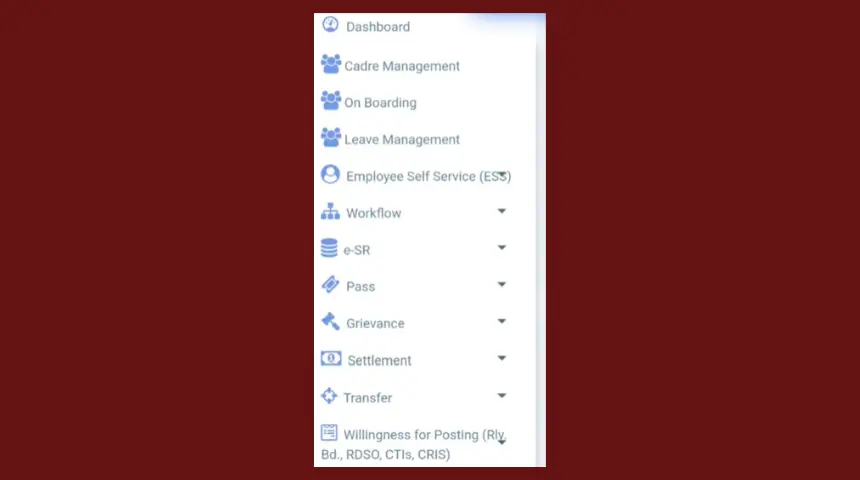
The HRMS Bihar portal has a built-in Complaint Module. Using it creates a tracked record with a reference number — much better than just calling. Here is how to do it.
HRMS Bihar Complaint Module — Dashboard View
- Login to hrms.bihar.gov.in with your Employee ID and password. If you cannot login, call 0612-2217601 first to resolve that.
- On the dashboard, find the Complaint or Grievance section. In some departments it is labelled Help or Support.
- Select your complaint category — options include login issue, salary discrepancy, service book error, GPF problem, leave issue, or other.
- Write a clear description. Include your Employee ID, department, district, dates involved, and exactly what is wrong. Be specific — vague complaints take longer to resolve.
- Attach a screenshot if the portal allows — this speeds up resolution significantly.
- Click Submit. You will receive a Complaint Reference ID. Screenshot it or write it down immediately.
- If the complaint is not resolved within 72 hours — escalate to CPGRAMS using your HRMS Reference ID. You can also call 0612-2217601 quoting the reference number.
⚠️ HRMS Complaint Number vs Helpline Number
There is no separate HRMS complaint number. The same helpdesk at
0612-2217601 handles both complaints and general queries. For a formal paper trail — use the Complaint Module inside the HRMS portal or email hrmshelp-bih@nic.in, as calls are not always tracked with a reference ID.
HRMS BRDS NIC — What It Is and When to Contact
A number of Bihar government employees search for "hrms brds.nic" — and rightly so because this comes up when diagnosing technical errors on the portal.
HRMS BRDS NIC refers to two bodies that jointly built and maintain the HRMS Bihar system — BRDS (Bihar Rural Development Society) and NIC (National Informatics Centre, India's government technology backbone). The actual portal URL hrms.bihar.gov.in is hosted on NIC infrastructure.
As a regular employee, you do not contact BRDS or NIC directly. Your escalation path is always: L1 helpdesk → District NIC Centre → HR Directorate. The District NIC Centre is the local face of NIC and handles HRMS technical issues at district level — including server downtime, biometric device registration, and data sync errors.
| Organisation | Role in HRMS Bihar | Contact Point for Employees |
|---|
| NIC Bihar | Technical infrastructure — hosting, server, network | Via District NIC Centre (L2 support) |
| BRDS Bihar | Implementation partner — Bihar Rural Development Society | Not directly contactable for employee issues |
| Finance Dept Bihar | Policy and data ownership of HRMS portal | HR Directorate, Patna (L3 support) |
| Your DDO | Department-level administrator for your HRMS account | First point of contact for many issues |
District NIC Centre Support — L2 HRMS Help
If the helpdesk at 0612-2217601 cannot fix your problem — which usually happens for issues like biometric registration failure, data sync errors between districts, or portal not loading at all from a specific location — you need to visit your District NIC Centre.
HRMS Bihar — District NIC Centres across all 38 Bihar districts
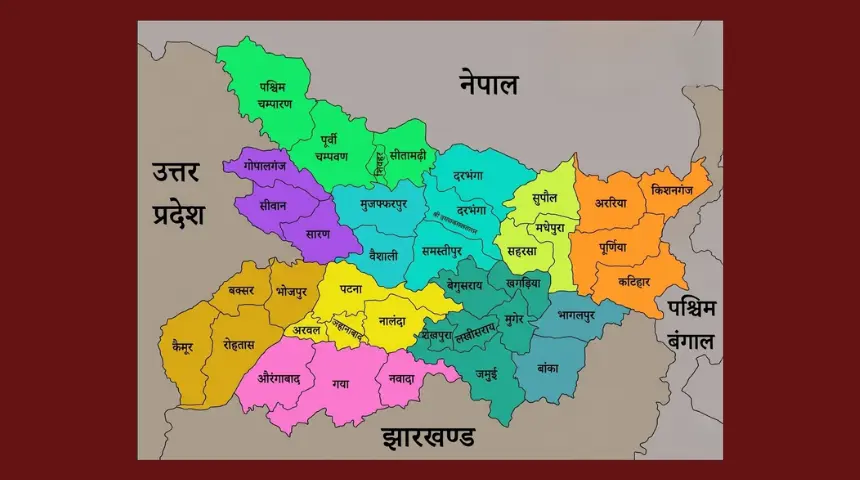
Every one of Bihar's 38 districts has a dedicated NIC (National Informatics Centre) office. These offices handle HRMS Bihar issues that require physical presence or backend server access. Key districts and their NIC contacts are available on the official NIC Bihar website at bihar.nic.in.
ℹ️ What District NIC Centres Handle for HRMS
Biometric device registration or failure • Data not syncing between district servers and Patna • Portal unavailable from a specific district • HRMS account discrepancies requiring backend database correction • New department integration issues • Hardware-level problems affecting multiple employees in one office.
Most Common HRMS Problems — Quick Fix Guide
Most employees who call 0612-2217601 have one of these problems. Try these fixes before calling — it saves time for everyone.
🔐 HRMS Bihar login not working — wrong password
Check that CAPS LOCK is off. Try Chrome in Incognito mode. Use Forgot Password on login page with your Employee ID and registered mobile. If mobile is not registered, contact your DDO.
📱 OTP not received on mobile
Check signal and network — OTPs sometimes delay on Airtel/Vi. Also check that your registered mobile number is still active. If the number has changed, your DDO needs to update it in the system — you cannot do this yourself.
💰 Salary slip not showing for the month
First confirm the salary has actually been disbursed by your DDO for that month. If yes, clear browser cache with Ctrl+Shift+Delete and reload. If still not showing after 48 hours of salary date, call 0612-2217601.
📋 Service book showing wrong information
Do not try to edit this yourself. Raise a complaint via the HRMS Complaint Module with documentary evidence — appointment letter, gazette notification, or increment order. The DDO then coordinates the correction through the portal.
📄 GPF statement not loading or showing 0 balance
Confirm you are a pre-January 2004 employee (GPF only applies to pre-2004 recruits). If yes, try the dedicated portal e-gpf.bihar.gov.in directly. Also see our
complete GPF guide for all three portal methods.
🌐 HRMS portal not opening at all — blank screen
Clear browser cache (Ctrl+Shift+Delete). Try Google Chrome version 80 or higher. Disable any VPN or ad-blocker. Government portals are often under maintenance between 2 AM and 6 AM. If still not working, the portal may be down — check after 1-2 hours or call the helpdesk.
👤 New employee — not able to register on HRMS Bihar
HRMS Bihar registration is not self-service. It is done by your DDO or department HR cell. Contact them with your appointment letter, Aadhaar card, and service book copy. They seed your data into the system and you receive your User ID and temporary password on your registered mobile.
🔒 Account locked after multiple failed attempts
Wait 30 minutes — accounts auto-unlock after a lock period. If still locked after 30 minutes, call 0612-2217601 with your Employee ID ready for identity verification and manual unlock.
Frequently Asked Questions — HRMS Bihar Helpline & Contact
What is the HRMS Bihar helpline number?+
The HRMS Bihar helpline number is 0612-2217601. This is the official L1 helpdesk for all HRMS Bihar portal issues faced by Bihar government employees. Support hours are Monday to Saturday, 8:00 AM to 10:00 PM. For email support write to hrmshelp-bih@nic.in. There is no separate number for different departments — all employees call the same number.
What is the HRMS customer care number?+
The HRMS customer care number is 0612-2217601. This is the same as the helpdesk number. The support team handles all categories — login problems, salary slip issues, service book errors, GPF queries, NPS concerns, password reset, and general portal navigation. Have your Employee ID ready before calling for faster resolution.
Is there an HRMS Bihar toll free number?+
As of March 2026, the Government of Bihar has not published a separate toll free number for HRMS Bihar. The official helpline is 0612-2217601 — this is the primary HRMS contact number for all Bihar government employees. You can also write to hrmshelp-bih@nic.in to avoid call charges entirely.
How to file an HRMS Bihar complaint?+
Login to hrms.bihar.gov.in → find Complaint or Grievance module on dashboard → select issue category → describe your problem with Employee ID and district → submit. You receive a Complaint Reference ID. If unresolved in 72 hours, escalate to
CPGRAMS using that reference number. For urgent issues call 0612-2217601.
What is HRMS BRDS NIC?+
HRMS BRDS NIC refers to the technical partnership between BRDS (Bihar Rural Development Society) and NIC (National Informatics Centre, India) that built and maintains the HRMS Bihar portal infrastructure. Employees do not contact BRDS or NIC directly. Your support path is always: call 0612-2217601 first, then your District NIC Centre if needed, then HR Directorate for policy issues.
What are the HRMS Bihar helpdesk support hours?+
HRMS Bihar helpdesk phone support at 0612-2217601 is available Monday to Saturday, 8:00 AM to 10:00 PM. The portal itself is available 24×7. Email at hrmshelp-bih@nic.in can be sent any time — responses come on working days within 24-48 hours. For urgent issues outside helpdesk hours, the Complaint Module inside the portal is always accessible.
What issues does the HRMS helpline handle?+
The HRMS Bihar helpdesk at 0612-2217601 handles: login and password problems, account lockout, salary slip not showing, OTP issues, service book errors, GPF statement not loading, leave application problems, new employee registration help, and general portal queries. For salary policy disputes or pension matters, they refer you to L3 — the HR Directorate, Patna.
Can I contact HRMS Bihar helpdesk on Sunday?+
Phone support at 0612-2217601 is available Monday to Saturday only. On Sunday the helpdesk is closed. However, you can submit a written complaint via email at hrmshelp-bih@nic.in or through the portal's Complaint Module on Sunday — it will be picked up on Monday morning. For truly urgent issues, visit your District NIC Centre on Monday.
📚 Related HRMS Bihar Guides
ℹ️ Disclaimer
Independent informational guide. Not affiliated with Government of Bihar or NIC. For official portal support visit
hrms.bihar.gov.in or call
0612-2217601.